Cybersecurity Basics
Basic Network Security Concepts: A Beginner’s Guide
Learn basic network security concepts through a packet journey: devices, DNS, firewalls, Wi-Fi, identity, encryption, monitoring, backups, and response.
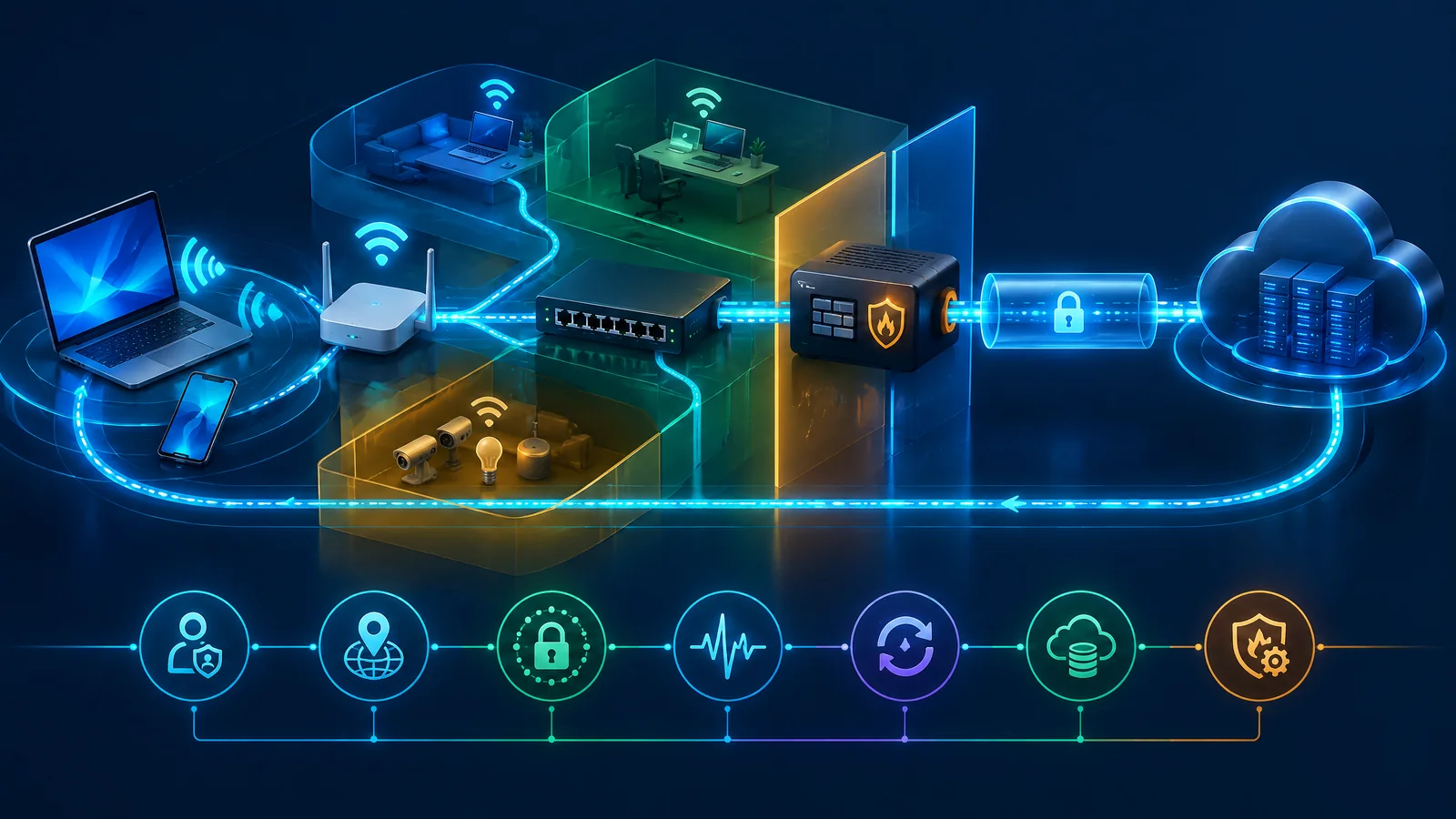
Basic network security concepts are the principles and safeguards used to protect devices, connections, services, and data as traffic moves across a network. They include secure configuration, access control, authentication, encryption, firewalls, updates, boundaries, monitoring, backups, and response. The aim is to reduce exposure, limit unauthorised access, notice problems, and recover safely, not promise perfect prevention.
What are basic network security concepts?
A network is the set of connected devices, paths, services, and people that exchange information. Network security is the connected practice of deciding what should connect, what traffic should be allowed, how identities are checked, how data is protected in transit, and how problems are detected and handled. A threat is a possible harmful event; a weakness is a condition that makes a pathway easier to use; risk is the possible effect on something you value. A firewall, password, or VPN is a control, not the whole practice.
Use one ordinary example throughout this guide: a student laptop or phone on home, hostel, college, or small-office Wi-Fi opens cloud email or a learning service. The request depends on the device and account, local addressing, Wi-Fi, switching, routing, DNS, encryption, service identity, and a return path. If one dependency is weak, the request may fail, reach the wrong place, expose an account, or leave too little evidence to understand what happened. The same model helps a household member, shop owner, or junior IT worker ask useful first questions.
At each point, use five prompts: Boundary — where does trust or traffic change? Decision — what is allowed, by whom, and for what purpose? Control — which safeguard reduces the exposure? Check — what can a beginner verify without guessing? Limitation — what remains outside this safeguard? This is an adaptation of risk-management and zero-trust ideas for a small network, not a claim that a home network needs an enterprise design. No single control covers every device, account, service, and recovery need.
How does a normal network request travel?
Start at the student device. Its operating system, browser or app, local security settings, stored account, and user action form the first boundary. The device needs a network address and a route before it can ask for a service. DHCP, or Dynamic Host Configuration Protocol, normally supplies local settings such as an address, gateway, and DNS choice. An IP address identifies an endpoint for communication; a MAC address identifies a local network interface. These are useful dependencies, not proof that the device or person is trustworthy.
The device then sends traffic over Wi-Fi to an access point, or AP. The AP joins the wireless client to the local network and passes traffic towards a switch or combined home gateway. A switch forwards traffic inside the local network, while the router chooses a path between the local network and an outside network. The router’s firewall may filter traffic according to policy. DNS, the Domain Name System, maps a service name to a destination so the app can begin the connection. A service may use ports to distinguish kinds of communication, but a port being reachable does not make the service safe.
The service connection should use an authenticated encrypted protocol such as HTTPS with TLS where supported. The response travels back through the internet edge, router, local network, AP, and device. Logs, alerts, accurate time, and a known owner can make that return path understandable; backups and a response plan matter if the account or device is later affected. Boundary: device to local network. Decision: may this device use this path? Control: identity, Wi-Fi protection, firewall policy, and encryption. Check: inspect the connected network and service indicator. Limitation: DHCP, DNS, and an address do not prove that a destination, account, or device is safe.
What do routers, switches, access points, and firewalls do?
These devices are often combined in one consumer box, which is why their roles can feel confusing. An access point supplies wireless connectivity; it is not the internet connection itself. A switch connects devices within a local network. A router moves traffic between networks, including the local network and the internet edge. A firewall applies allow or deny decisions to traffic at a boundary. On a home gateway, one box may perform all four roles, but the security questions remain separate.
A beginner comparison should connect each device to five practical questions: what boundary it serves, what decision it makes, which control supports that decision, what setting the owner can verify, and what the device cannot cover. That keeps the table below from becoming a list of labels. For example, a router may decide whether traffic crosses the edge, while an account system decides whether a person may use the service after the traffic arrives.
The safe check is not “is this device secure?” It is “what boundary does it serve, who owns its settings, and what evidence can I see?” A router can have a firewall feature yet still have stale firmware, exposed administration, weak credentials, or an unsafe forwarding rule. A switch can connect the right devices or quietly put too many systems in one reachable area. A firewall can filter traffic while a compromised account, missing backup, or unpatched laptop continues to cause harm.
How do DNS, DHCP, encryption, and VPNs fit together?
DHCP gives a device the local settings it needs to start. DNS turns a human-readable service name into a destination that the device can contact. Neither service, by itself, decides whether the user should read a mailbox or whether the device is free of harmful software. If DHCP supplies the wrong gateway or DNS is unavailable, a user may see a connection failure; if settings are changed without authority, the user may be sent towards an unintended destination. Beginners should treat these as dependencies to document and protect, not as magic security switches.
HTTPS uses TLS, or Transport Layer Security, to help protect data in transit between a client and a service. The browser or app checks service identity through certificates and then uses encryption for the connection. This can reduce exposure while data crosses networks, but it does not make a weak password, unsafe endpoint, or dishonest recipient safe. A VPN, or virtual private network, can create a protected connection across an untrusted network when a trusted organisation or service requires it. The VPN software, account, endpoint, server, and settings still need support and updates.
Apply the five-part model: Boundary: the device leaves the local network or enters a protected service path. Decision: which destination and connection method are approved? Control: maintained DNS and DHCP settings, TLS, and a VPN where its use is justified. Check: confirm the device uses the intended network, the browser shows the expected secure connection, and the VPN status is understood. Limitation: encryption protects a path, not every endpoint, account, or backup. Do not follow online advice that asks you to intercept, alter, or probe traffic; beginners need defensive verification only.
What is a trust boundary, and where does segmentation help?
A trust boundary is a point where a connection, identity, device, or request receives a new policy decision. The boundary may be the home Wi-Fi passphrase, a guest network, a router firewall, a cloud sign-in, or a shared office folder. “Inside” should not mean automatically trusted. A guest phone, smart television, office laptop, and router-management device may have different owners, updates, data, and consequences even when they use the same broadband service.
Segmentation means separating systems or traffic into zones so that access between them can be limited. A home might place visitors on guest Wi-Fi; a small office might separate ordinary user devices from management equipment or sensitive systems when its equipment and skills support that choice. The beginner question is simply, “What does this device need to reach?” Then allow only that need where practical. This can reduce unnecessary movement between zones, but it does not make each zone safe by itself.
Use Boundary: guest, user, IoT, management, sensitive, or external service zone. Decision: should this identity or device cross the boundary, and for what service? Control: guest access, least privilege, firewall policy, or an appropriate network split. Check: draw the zones and list the connections an owner can explain. Limitation: a poor rule, shared credential, weak endpoint, or unmanaged provider can still defeat the intended separation. This page stays at the beginner level; the separate network-segmentation-explained article owns advanced topology and design detail, including implementation trade-offs.
How should a beginner secure home Wi-Fi or a small office?
Begin with ownership. Identify the broadband gateway, separate access points, switches, important devices, and the person who can change settings. Replace factory administrator credentials with a strong unique value, use the strongest supported current wireless protection offered by the equipment, and choose a unique Wi-Fi passphrase. Update router and access-point firmware while the device remains supported. If an internet provider manages the gateway, record what you can check and what must be raised with the provider rather than guessing.
Review the settings that widen the boundary. Turn off remote administration, WPS, UPnP, or other services when they are unnecessary and the owner understands the effect. Use guest access for visitors or suitable IoT devices when it genuinely separates traffic. Avoid automatic connection to open networks, review unknown connected devices, and keep both router and host firewalls enabled where supported. The purpose is to remove avoidable exposure, not to create a long list of settings that nobody can maintain.
For the model: Boundary: radio network and router administration. Decision: who joins and who can change the gateway? Control: current wireless protection, unique credentials, firmware, guest access, and restricted administration. Check: sign in through the authorised local method, inspect device and firmware lists, and record the review date. Limitation: archived guidance may not match a current device interface; a secure Wi-Fi passphrase cannot protect an already compromised phone, a cloud account, or a backup. Ask an ISP or qualified administrator for help when the equipment is shared, inaccessible, or tied to a larger office.
How do patching and secure configuration reduce exposure?
Patching means applying supported fixes to operating systems, applications, browsers, router firmware, access points, and other software. Secure configuration means choosing settings that reduce unnecessary access, such as changing defaults, removing unused services, limiting administration, and keeping management paths off the public internet where possible. A small-office owner should know which assets are supported, which receive automatic updates, and which have an owner responsible for checking success. A junior IT worker can keep a simple list of asset, version, owner, update status, exception, and next review.
Start with the boundary that matters most: the router, remote-access service, public application, administrator account, or device holding sensitive work. Use encrypted administration such as HTTPS or SSH where the device supports it and where the administrator understands the setting. Disable unnecessary port forwarding and services through an authorised change process. If an old device cannot be updated, isolate it where feasible, reduce its access, plan replacement, and write down the remaining limitation rather than treating it as fixed.
Apply Boundary: management interface, service, or endpoint. Decision: does this asset need this feature, access, or exposure? Control: supported software, updates, changed defaults, reduced services, restricted management, and least privilege. Check: verify version, support status, update result, and visible exceptions. Limitation: patching reduces known exposure but does not remove deceptive messages, stolen credentials, unsafe configuration, or backup failure. A clean update record is evidence of one control, not a certificate that the network is safe.
What should a network monitor and log?
Monitoring turns activity into a question that someone can answer. Useful records may include device inventory changes, authentication successes and failures, privileged actions, router or firewall decisions, configuration changes, unusual device behaviour, and service alerts. A household may have only a few router events and account notifications. A small office may also have endpoint and cloud logs. Keep the focus on records that help an owner identify what changed, when it changed, and who can make the next decision.
Accurate time matters because a sequence is easier to understand when device, router, cloud, and response records use a consistent clock. Protect logs from casual editing, retain them for a purpose, and decide who reviews important alerts. Monitoring without an escalation route creates a list of notifications rather than a response capability. Minimise access to personal information in logs and explain the review purpose to people whose activity is recorded. If a system cannot produce useful logs, record that gap and avoid claiming visibility.
Use Boundary: an account, device, network edge, or service producing evidence. Decision: which event needs review and who can act? Control: useful logs, time accuracy, protected retention, alerts, and a named reviewer. Check: trigger a benign account or configuration review and confirm the event is visible to the authorised owner. Limitation: absence of an alert is not proof that no issue occurred when coverage is incomplete. CERT-In’s Section 70B directions include rolling 180-day log language for specified covered entities; that is not a blanket household instruction, and current applicability must be checked against the actual entity and direction.
How do backups and incident response complete the system?
A backup is useful only when it is separate or otherwise protected from the failure that might affect the working copy, contains the data the owner actually needs, and can be restored. A household may prioritise photographs, identity documents, and account recovery information. A small office may prioritise customer records, payment records, essential documents, and the configuration needed to resume work. Use encryption where appropriate, protect backup administration, identify retention choices, and test a restoration rather than relying on a status icon.
A simple response sequence is: notice a signal; contain safely using an authorised decision; preserve relevant details; contact the owner, provider, or support path; communicate carefully; restore from a known-good copy; then review what allowed the event. Isolation may mean disconnecting an affected device from ordinary access, disabling a suspected account, or pausing a risky process, but the right action depends on authority and the business context. Do not improvise destructive investigation or delete useful records.
For the model: Boundary: working data and recovery environment. Decision: what must be protected, isolated, restored, and communicated first? Control: separate copies, restore tests, offline contacts, roles, and a short response plan. Check: restore a non-production sample or agreed set and record the result. Limitation: a backup may contain old, incomplete, or already affected data; response plans need current contacts and practice. A recovery test demonstrates one path at one time, not a promise of full recovery for every incident.
What should Indian readers know about CERT-In guidance?
For readers in India, CERT-In’s 15 Elemental Cyber Defense Controls for MSMEs can be used as a practical starting baseline. Its areas include network and Wi-Fi protection, patching, secure configuration, MFA, access review, logs, backups, and incident management. Treat that baseline as a way to organise basic decisions for an applicable MSME, not as a complete security programme, a product list, or evidence that a particular business meets every current obligation.
The Section 70B directions are a separate source with a separate scope. They discuss specified covered entities, listed incidents, a reporting window described as six hours, a Point of Contact, and rolling 180-day retention of relevant ICT-system logs in India. The FAQ says individual citizens are not covered by those directions. That does not turn a short article into an applicability decision: an organisation should check current official directions, sector rules, contracts, system scope, and qualified advice before deciding what applies.
Use Boundary: general cyber hygiene, an MSME baseline, or a specified direction. Decision: which guidance lane and entity scope match this reader? Control: document ownership, access, updates, logs, backups, and response contacts. Check: record the entity type, systems, current source date, and review owner. Limitation: NIST, CISA, and UK NCSC guidance is not automatically Indian law, and CERT-In material should not be treated as interchangeable with foreign frameworks. A household should not infer a six-hour reporting duty from this page. This section provides context, not a legal conclusion.
What is a sensible beginner network-security checklist and learning path?
A useful first pass is small enough to complete and clear enough to repeat. Today, inventory devices and accounts, change defaults, enable MFA on important accounts, update the router and devices, and inspect Wi-Fi and guest settings. This gives the reader a visible starting boundary. If a device is ISP-managed, unsupported, shared by several offices, or tied to an important service, mark the limitation and ask the owner, provider, or qualified administrator before changing it.
This week, remove unused accounts and services, confirm router and host firewalls, review available logs and alerts, and create a protected backup of important data. This month, test a restore, document response contacts and recovery priorities, review access, draw the basic trust boundaries, and decide whether the environment needs deeper device-security study or advanced segmentation design. The next step is not automatically a bigger tool. It is better evidence about what is connected, who owns it, what it can reach, and how work would resume after a problem.
Use the checklist below as questions, not as a score. Boundary: the asset, account, service, or zone under review. Decision: what must be allowed, protected, recorded, or restored? Control: the smallest suitable safeguard. Check: evidence a beginner can obtain safely. Limitation: an unanswered question remains open work. Continue from this beginner article to the network-security topic hub, the advanced network-segmentation-explained article when design depth is needed, or the network-device-security learning hub for structured study. Those destinations have different jobs; this page owns the connected fundamentals.